
Install MCPs via PR
Enable ctx| MCP for a team by raising GitHub pull requests that add agent config files to repositories.
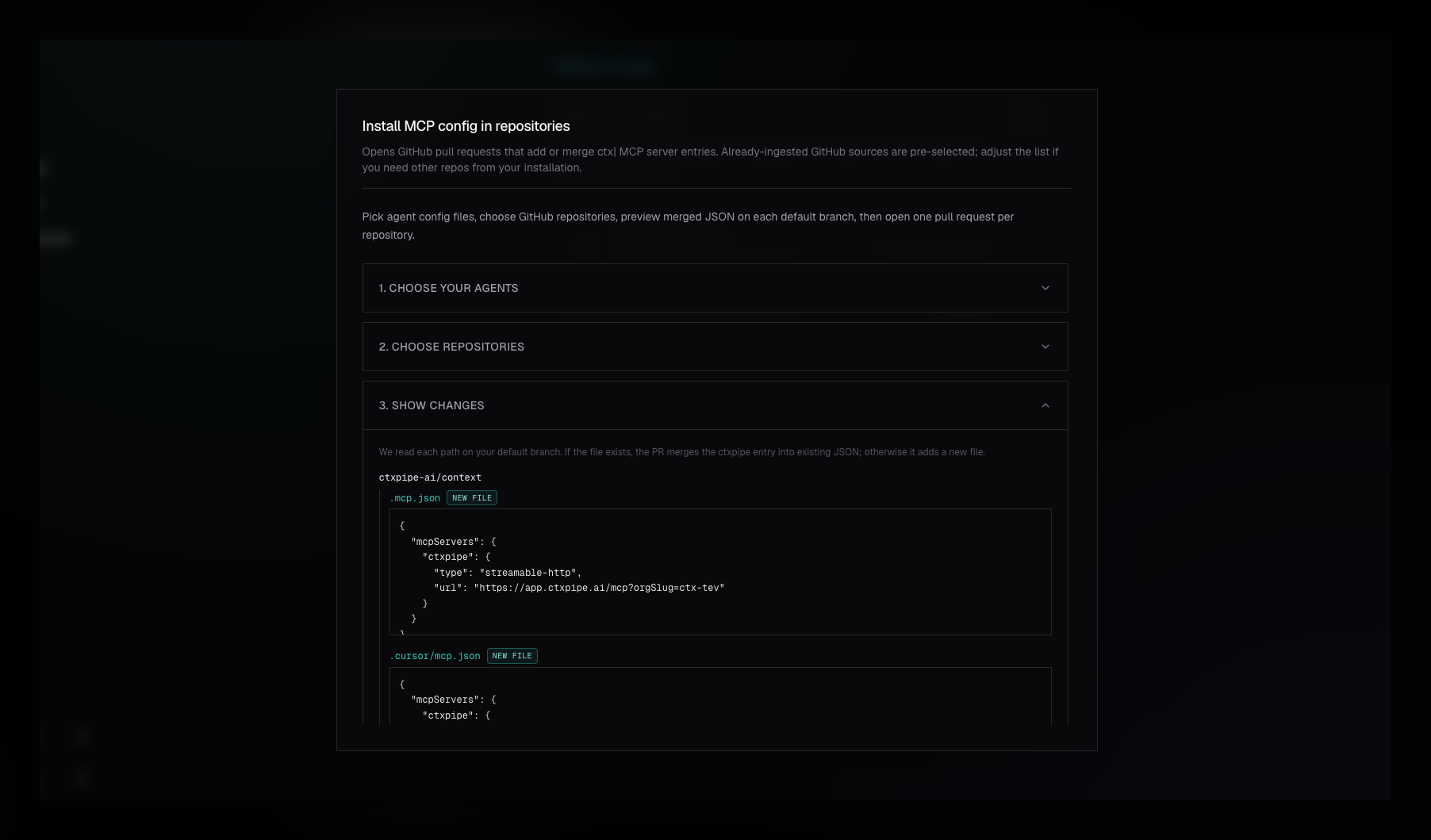
The Install MCP via PRs workflow is the team setup path for ctx| MCP. Instead of asking every developer to run a local command or paste JSON, ctx| raises GitHub pull requests that add the right MCP config files to selected repositories.
Use this when MCP access should be reviewed, merged, and inherited by everyone working in a repo. For a single developer setting up their own machine, use the CLI instead: ctx| MCP.
Prerequisites
- A GitHub App installation is connected for the organization.
- The target repositories are visible to that installation.
- Your ctx| user is an organization admin or owner.
- The GitHub App installation has enough repository access to create branches, commit files, and open pull requests.
Supported Agent Configs
The PR wizard can generate config for:
| Agent | File |
|---|---|
| Cursor | .cursor/mcp.json |
| Claude Code | .mcp.json |
| OpenCode | opencode.json |
For Cursor and Claude Code, ctx| writes a top-level mcpServers.ctxpipe entry.
For OpenCode, ctx| writes a top-level mcp.ctxpipe entry with
type: "remote" and enabled: true.
The PR flow currently does not generate config for Codex or VS Code. Use the CLI for those clients:
npx ctxpipe mcp add --client codex --scope user
npx ctxpipe mcp add --client vscode --scope repo
What Gets Raised
For each selected repository, ctx|:
- Reads the existing config files from the repository's default branch.
- Merges a
ctxpipeMCP entry without removing unrelated servers. - Creates a branch named like
ctxpipe/mcp-config-.... - Commits the generated config files.
- Opens one pull request for that repository.
The generated config points at your organization-scoped MCP endpoint:
https://app.ctxpipe.ai/mcp?orgSlug=your-orgSelf-hosted deployments keep the same path and query parameter, but use the deployment base URL.
Workflow
- Open Repositories.
- Choose Install MCP via PRs from the repository actions menu.
- Select one or more agent config formats.
- Select the repositories that should receive config.
- Review the merged JSON preview.
- Raise pull requests.
Already indexed GitHub repositories are preselected when the wizard opens from the Repositories page, but you can adjust the list.
Each request can include up to 25 repositories. If one repository fails, ctx| still reports successful PRs for the others and shows the per-repository failure.
Generated Config Examples
Cursor and Claude Code use mcpServers:
{
  "mcpServers": {
    "ctxpipe": {
      "type": "streamable-http",
      "url": "https://app.ctxpipe.ai/mcp?orgSlug=your-org"
    }
  }
}
OpenCode uses mcp:
{
  "mcp": {
    "ctxpipe": {
      "type": "remote",
      "url": "https://app.ctxpipe.ai/mcp?orgSlug=your-org",
      "enabled": true
    }
  }
}
Do not add API keys to repository config. The PR workflow is designed for MCP clients that can complete OAuth authorization after the config is merged.
Merge Behavior
ctx| reads the default branch version of each target file before generating the
PR. When the file already contains compatible JSON, ctx| merges the ctxpipe
entry into the existing object instead of replacing unrelated MCP servers.
If a config file does not exist, ctx| creates it. If an existing file is not compatible JSON for that client shape, ctx| writes a fresh valid config for that file in the PR so reviewers can decide whether to merge it.
After Merge
Once the PR is merged, developers still need to authorize ctx| from their MCP client the first time the client connects. The committed config tells the client where the remote server is; OAuth decides who the user is and what organization context they can access.