
Retry indexing or unindex
Recover an ingestion run without removing the repository, or deliberately remove its context from ctx|.
Unindexing removes a repository from ctx| for the current organization. Use it when a repository should no longer contribute to search, Chat, MCP, or the knowledge graph.
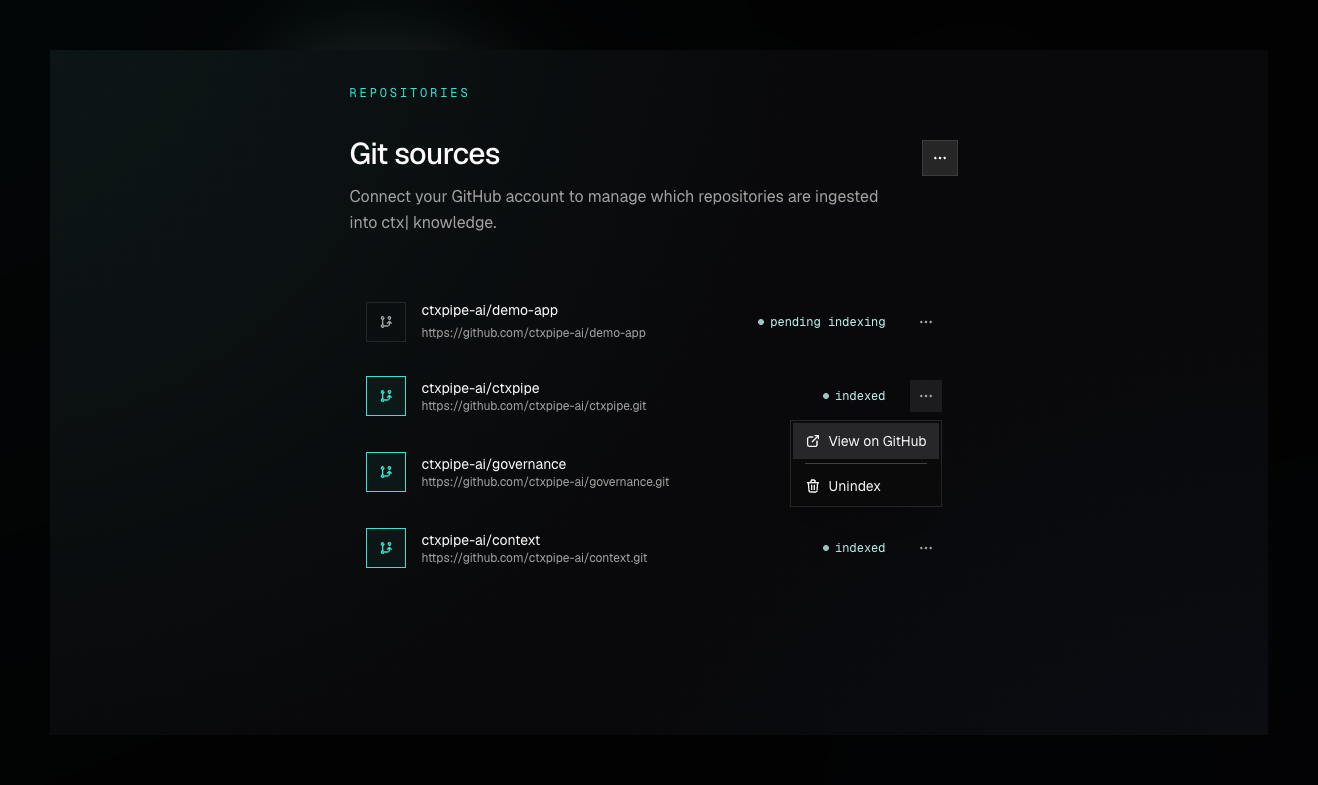
Unindex a Repository
- Open Repositories.
- Open the row action menu for the repository.
- Choose Unindex.
- Confirm the destructive action.
The backend deletes the repository row for the organization and runs cleanup for associated graph and checkout state. The UI removes the row after the API call succeeds.
DELETE /:orgSlug/api/v1/repositories/:idRetry indexing
Use Retry indexing when the repository should remain connected but its latest ingestion run failed or completed with issues:
- Open Repositories.
- Open the repository row menu.
- Choose Retry indexing.
- Follow the new run through the repository status.
Retrying keeps the repository record and starts a fresh ingestion attempt.
When to retry
Retry indexing when:
- A repository was added before important docs or instruction files existed.
- You need to rebuild graph claims after a major refactor.
- Ingestion failed and operator logs show the source can now be cloned/indexed.
- A run completed with issues and you have resolved the cause.
Operational Notes
- Unindexing is organization-scoped. It does not change the GitHub repository or GitHub App installation.
- Retrying can take time because search and graph context both need to run again.
- During a retry, Chat and MCP answers may be incomplete for that repository until indexing finishes.
Unindexing a context repository
Unindexing stops all files in that repository from contributing to ctx|, including generated Linear, Notion, Confluence, or Slack context. It does not delete those files from Git and does not remove the upstream connector.