
Remote MCP
Choose the right remote ctx| MCP install path for individuals, teams, and clients that need manual configuration.
ctx| exposes an organization-scoped remote MCP server at:
https://app.ctxpipe.ai/mcpOAuth binds one organization during authorization. ?orgSlug=your-org remains
valid for legacy and manually configured clients. For self-hosted deployments,
keep the same /mcp path and swap in your own base URL.
What the MCP gives an agent
The primary tool is ctx_advisor. It helps an agent discover organization
standards, architecture decisions, connected systems, and likely source areas
before the agent plans or edits code.
It is strongest at questions such as:
What standards and prior decisions apply before I change this authentication flow?Which services depend on this API, and which source files should I verify?ctx_advisor is not a code-review guarantee or a substitute for current source.
Ask it to separate verified evidence from inference, then inspect critical files
with the coding agent's repository tools.
Choose Your Install Path
There are three practical ways to install ctx| MCP:
- Individual install with the CLI - best for a developer setting up their own agent clients on one machine.
- Raise pull requests - best for enabling a team by committing MCP config files into shared repositories.
- Manual config - useful when you need to paste JSON yourself or use a client the CLI does not fully automate.
The CLI and PR flow both write configuration. They do not remove the need for MCP authorization. When a client first uses ctx| MCP, it should still redirect you to ctx| so you can sign in and authorize access. If the client cannot complete OAuth, use API-key auth.
CLI installer (npx ctxpipe)
The CLI is the recommended path for an individual developer. It detects common agent clients, writes the right config shape for each one, and lets you choose whether the config belongs to the current repo, your user profile, or both.
From any repo:
npx ctxpipe init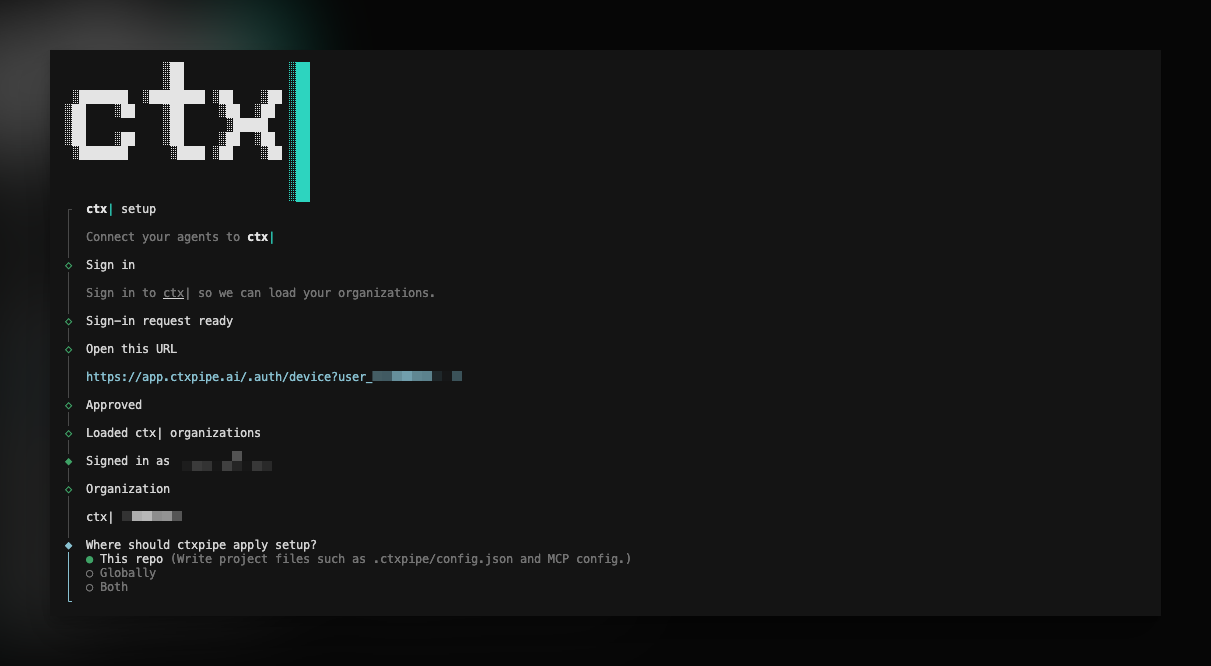
That runs an interactive wizard for:
- signing in for setup,
- selecting your organization,
- choosing repo, user, or both scopes,
- selecting agent clients,
- optionally enabling Markdown local memory under
.ai/memory/(hooks + skills, not an MCP server), - reviewing the planned file changes before writing.
For MCP-only setup, use:
npx ctxpipe mcp addFor scripts and CI, use explicit flags:
npx ctxpipe init --org acme --agents cursor,claude --scope repo --non-interactive
npx ctxpipe mcp add --org acme --client opencode --scope user --non-interactive
npx ctxpipe mcp add --org acme --client cursor --scope both --auth api-key --non-interactive
npx ctxpipe doctor --json
Use npx ctxpipe init --help and npx ctxpipe mcp add --help for the full flag list, including --base-url, --org, --scope, --agents, --client, --auth, --non-interactive, --json, and --dry-run.
Setup sign-in is separate from MCP authorization. The CLI signs you in so it can list organizations and write correct config. It stores setup credentials in the OS keychain when available, with a file fallback under ~/.config/ctxpipe/ when keyring access is not possible.
Supported CLI clients:
- Cursor - repo config in
.cursor/mcp.json, user config in~/.cursor/mcp.json. - Claude Code - repo config in
.mcp.json; user setup usesclaude mcp addwhen the Claude CLI is available. - OpenCode - repo config in
opencode.json, user config in~/.config/opencode/opencode.json. - VS Code / Copilot - repo config in
.vscode/mcp.json; user setup provides the VS Code install link. - Codex - repo config in
.codex/config.toml, user config in~/.codex/config.toml. Without an API-key header, user setup usescodex mcp addwhen available; otherwise the CLI prints the command to run.
Local memory (Markdown)
The CLI can also seed Markdown-only local memory under .ai/memory/ with
host capture hooks and promote/recall skills. This is not a second MCP
server — durable facts stay in Git-reviewed Markdown; hooks only write a
gitignored candidate inbox.
npx ctxpipe init
npx ctxpipe memory init
npx ctxpipe init --org acme --agents cursor --scope repo --memory --non-interactive
The interactive npx ctxpipe init wizard includes local memory setup, so you do
not need to run memory init separately for the normal first-time setup flow.
Use npx ctxpipe memory init when you want local memory only, or when remote
ctx| MCP is already configured and you are adding memory later.
Read the full guide: Local memory.
API-key auth
OAuth remains the default for a developer on a laptop — the CLI without --auth, and Install MCPs via PR. Use an API key only when a client cannot complete the browser OAuth flow (CI, headless agents, a shared GUI environment, or a host that accepts a static custom header).
Keys authenticate MCP with the x-api-key header. Do not send the key as Authorization: Bearer; Bearer stays OAuth.
The CLI never mints keys. Create them in the product, then interpolate CTXPIPE_API_KEY in client config.
User keys and organization keys
| Personal keys | Organization keys | |
|---|---|---|
| Where to mint | User account → API Keys | Organisation settings → API Keys |
| Who can mint | You, for yourself | Organization admin or owner |
| Authenticates | You as a member | The organization — not the person who minted the key |
| MCP URL | Requires ?orgSlug= | Generic /mcp works. ?orgSlug= is optional and must match the bound organization |
REST (/:orgSlug/api/v1) | Yes, as that user | No. Organization keys are MCP /mcp only |
One organization key binds one organization. Omit ?orgSlug= or send the bound slug; a mismatch returns 404. The minter leaving the organization does not revoke the key. Members never see the plaintext after create; the secret is shown once.
User keys and organization keys share the env name CTXPIPE_API_KEY. One process holds one active key.
New keys inherit a 30-day default expiry and a limit of 1,000 requests per hour. Never-expiring keys are allowed; the UI warns that they are long-lived secrets. Recreate a key after it expires; existing keys keep the limit stored when they were minted. Name each key. Rotate by minting a new key, swapping CTXPIPE_API_KEY, then revoking the old one.
--auth api-key writes a client-specific interpolation of CTXPIPE_API_KEY, never the secret. That placeholder is safe in repo or user config (--scope repo, user, or both). init and mcp add do not read CTXPIPE_API_KEY. Set the variable in the MCP client environment so the client can send x-api-key. GUI apps often do not inherit the shell that ran the CLI. See Set CTXPIPE_API_KEY.
The CLI still writes ?orgSlug= (personal keys need it; organization keys accept a matching slug). Organization keys also work on the generic /mcp URL with no query:
{
  "mcpServers": {
    "ctxpipe": {
      "type": "streamable-http",
      "url": "https://app.ctxpipe.ai/mcp",
      "headers": {
        "x-api-key": "${env:CTXPIPE_API_KEY}"
      }
    }
  }
}
npx ctxpipe mcp add --org acme --client cursor --scope both --auth api-key --non-interactiveSetting CTXPIPE_API_KEY in the environment is not enough on its own. ctx| MCP is a remote Streamable HTTP server, so the client must send x-api-key on HTTP requests. Cursor and Claude do not invent that mapping from a well-known env name. The interpolation in MCP config (or claude mcp add --header) is what tells the client to send the header.
If a host lets you attach a custom request header, send x-api-key interpolating CTXPIPE_API_KEY. Do not use Bearer for the API key, and do not put the secret in client or repository files.
Cursor
Repo .cursor/mcp.json or user ~/.cursor/mcp.json:
{
  "mcpServers": {
    "ctxpipe": {
      "type": "streamable-http",
      "url": "https://app.ctxpipe.ai/mcp?orgSlug=your-org",
      "headers": {
        "x-api-key": "${env:CTXPIPE_API_KEY}"
      }
    }
  }
}
Claude Code
Project .mcp.json (or the same ${CTXPIPE_API_KEY} form in a user header):
{
  "mcpServers": {
    "ctxpipe": {
      "type": "http",
      "url": "https://app.ctxpipe.ai/mcp?orgSlug=your-org",
      "headers": {
        "x-api-key": "${CTXPIPE_API_KEY}"
      }
    }
  }
}
OpenCode
opencode.json in the repo, or user ~/.config/opencode/opencode.json:
{
  "mcp": {
    "ctxpipe": {
      "type": "remote",
      "url": "https://app.ctxpipe.ai/mcp?orgSlug=your-org",
      "enabled": true,
      "headers": {
        "x-api-key": "{env:CTXPIPE_API_KEY}"
      },
      "oauth": false
    }
  }
}
oauth: false stops OpenCode from starting a browser flow after a 401.
VS Code / Copilot
Repo .vscode/mcp.json or the equivalent user-scope install payload:
{
  "servers": {
    "ctxpipe": {
      "type": "http",
      "url": "https://app.ctxpipe.ai/mcp?orgSlug=your-org",
      "headers": {
        "x-api-key": "${env:CTXPIPE_API_KEY}"
      }
    }
  }
}
Codex (.codex/config.toml and ~/.codex/config.toml)
Codex loads MCP servers from both files in trusted projects: project .codex/config.toml overrides user ~/.codex/config.toml. Interpolation is safe in either file. Codex wants the variable name, not $VAR or the secret:
[mcp_servers.ctxpipe]
url = "https://app.ctxpipe.ai/mcp?orgSlug=your-org"
env_http_headers = { "x-api-key" = "CTXPIPE_API_KEY" }
Set CTXPIPE_API_KEY
init and mcp add do not consume CTXPIPE_API_KEY. npx ctxpipe doctor mcp does, when the variable is set in that process: it sends x-api-key and expects HTTP 2xx initialize (ready-for-api-key). If the variable is unset or blank, doctor keeps OAuth-discovery checks.
For MCP clients, the client process must see CTXPIPE_API_KEY so it can interpolate the header. export in a terminal that only ran npx ctxpipe init is not enough if the agent is a GUI app.
To probe API-key initialize from the CLI:
CTXPIPE_API_KEY=ctxp_... npx ctxpipe doctor mcp --url "https://app.ctxpipe.ai/mcp"CLI agents (inherit the shell you start them from):
- Cursor CLI (
agent/cursor-agent):export CTXPIPE_API_KEY=ctxp_...in that terminal, then runagent. Persist with~/.zshenvor~/.bash_profileif you want it on every CLI session. Do not rely on.zshrc/ direnv alone — Cursor CLI can start a non-interactive shell and skip them. - Claude Code: same pattern — export, then
claude(Claude env vars). Unset vars in.mcp.jsonstay as literal${CTXPIPE_API_KEY}. - Codex / OpenCode: export in the same terminal before starting the CLI.
Example:
export CTXPIPE_API_KEY=ctxp_...
agent
# or: claude / codex / opencode
GUI apps (Dock, Finder, Start Menu, desktop entry do not load .zshrc):
- Cursor desktop: either (1) macOS
launchctl setenv CTXPIPE_API_KEY 'ctxp_...'then fully quit and reopen Cursor, (2) Linux user/session environment (/etc/environmentor systemdenvironment.d), (3) Windows user environment variables, then restart, or (4) launch Cursor from a terminal that already has the export (cursor .). - VS Code / Copilot: same GUI rule as Cursor desktop.
After changing GUI env, restart the app. Then reconnect the ctx| MCP server.
Team Setup Via Pull Requests
For a team, committing MCP config files into repositories is usually better than asking every developer to hand-edit local files. ctx| can raise GitHub pull requests that add or merge the right config files for selected repos.
Use this path when:
- your team wants a reviewed, repeatable MCP rollout,
- config should travel with the repository,
- admins want to enable Cursor, Claude Code, or OpenCode for multiple repos at once.
The PR workflow currently supports:
- Cursor via
.cursor/mcp.json, - Claude Code via
.mcp.json, - OpenCode via
opencode.json.
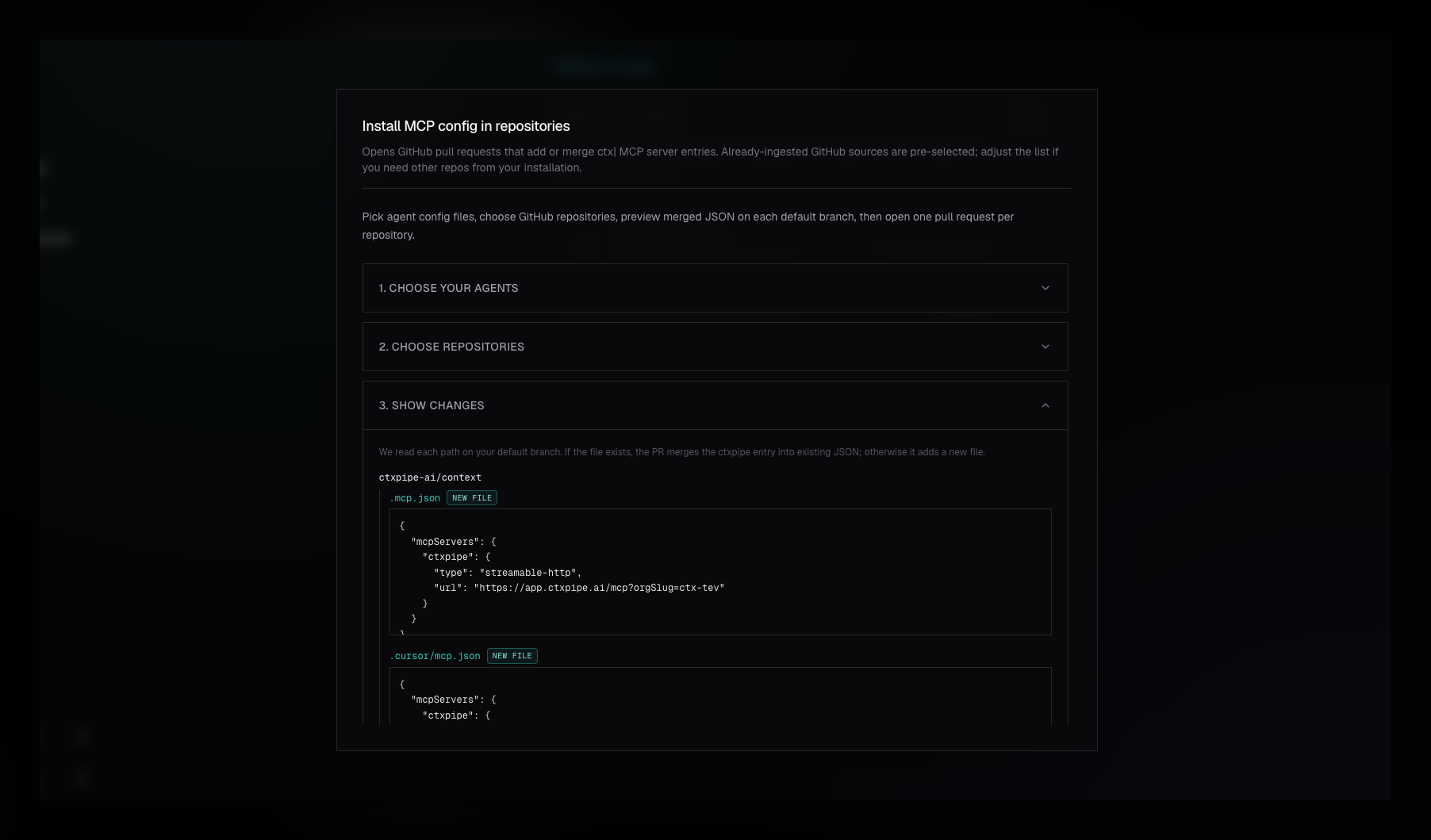
It does not currently raise PRs for Codex or VS Code config. Use the CLI for those clients.
To use the PR workflow, open Repositories, choose Install MCP via PRs, select agent config formats and repositories, review the JSON preview, then raise the PRs. Each repository gets its own branch and pull request.
You must have a connected GitHub App installation, the target repositories must be visible to that installation, and your ctx| user must be an organization admin or owner.
Read the full team rollout guide: Install MCPs via PR.
Manual Configuration
Manual config is the fallback when you do not want to use the CLI, the client is managed elsewhere, or you need to inspect exactly what will be written.
Your MCP client should redirect you to ctx| to sign in and authorize access. After approval, it returns to the client and the server is ready to use.
No bearer token setup is required when your client supports OAuth redirect for MCP. If it cannot complete OAuth, use API-key auth.
Client-Specific Configuration
Different clients do not use exactly the same JSON shape. That is the main reason the CLI exists.
Cursor
Config file: .cursor/mcp.json at the root of your project, or ~/.cursor/mcp.json for user-level config.
{
  "mcpServers": {
    "ctxpipe": {
      "type": "http",
      "url": "https://app.ctxpipe.ai/mcp?orgSlug=your-org"
    }
  }
}
Claude Code
Project config file: .mcp.json.
{
  "mcpServers": {
    "ctxpipe": {
      "type": "http",
      "url": "https://app.ctxpipe.ai/mcp?orgSlug=your-org"
    }
  }
}
For user-level setup, prefer npx ctxpipe mcp add --client claude --scope user or the Claude CLI's claude mcp add command.
OpenCode
Config file: opencode.json at the repo root, or ~/.config/opencode/opencode.json for user-level config.
{
  "mcp": {
    "ctxpipe": {
      "type": "remote",
      "url": "https://app.ctxpipe.ai/mcp?orgSlug=your-org",
      "enabled": true
    }
  }
}
VS Code / Copilot
Repo config file: .vscode/mcp.json.
{
  "servers": {
    "ctxpipe": {
      "type": "http",
      "url": "https://app.ctxpipe.ai/mcp?orgSlug=your-org"
    }
  }
}
For user-level setup, use the install link printed by npx ctxpipe mcp add --client vscode --scope user.
Codex
Use the Codex MCP command:
codex mcp add ctxpipe --url "https://app.ctxpipe.ai/mcp?orgSlug=your-org"The CLI prints this for you when it cannot run it directly.
Other clients
If your client's docs only mention http or SSE, check the current client documentation. New remote MCP integrations generally use Streamable HTTP, but client config keys still vary.
Troubleshooting
- CLI sign-in worked, but the MCP client still asks for authorization - expected. CLI setup auth and MCP client OAuth are separate flows.
- Connection fails after pasting URL only - add the client-specific
typefield. Most clients do not infer the transport reliably. - OpenCode shows the server but it never connects - use the top-level
mcp.ctxpipeshape withtype: "remote"andenabled: true. - Cursor or Claude rejects the server type - use
"type": "http". The protocol is still Streamable HTTP;httpis the client config key. - Team PR flow is unavailable - confirm GitHub is connected, the repositories are visible to the GitHub App installation, and your ctx| account is an organization admin or owner.
- Your client cannot complete OAuth - use API-key auth.
--auth api-keywrites interpolation, not the secret. SetCTXPIPE_API_KEYin the MCP client environment; see Set CTXPIPE_API_KEY. - Organization key on REST returns 401 - expected. Organization keys authenticate
/mcponly. Use a personal key or a signed-in session for/:orgSlug/api/v1. - Organization key with the wrong
orgSlugreturns 404 - omit the query, or use the bound organization's slug.
Notes
orgSlugis optional for OAuth grants that were bound to an organization during authorization, and for organization API keys. Personal user keys still require?orgSlug=. Replaceyour-orgwith your organization slug when configuring a legacy or manual connection explicitly.- Do not commit secrets into repository MCP config. Environment-variable references are safe to commit; the secret stays in the client process environment.
- For team-wide repo config, prefer Install MCPs via PR over asking every developer to copy JSON by hand.
Related
- Managing your organization - org slug and membership
- Install MCPs via PR - team rollout through GitHub pull requests
- Local memory - repo-local Markdown memory with capture hooks